
The monthly Google Ads client report, written by AI and checked by you
A free 10-slide report template for Google Slides or PowerPoint, plus a tested prompt that turns five Google Ads exports into the commentary in ChatGPT, Claude or Gemini. It computes every change from your data, shows its math, and labels guesses as guesses. From DetectivePPC.
By DetectivePPC · Google Ads report names and columns checked against Google Ads Help on November 15, 2026. Sample data and output are fictional.
Get the report kit
SAMPLE · FICTIONAL DATA
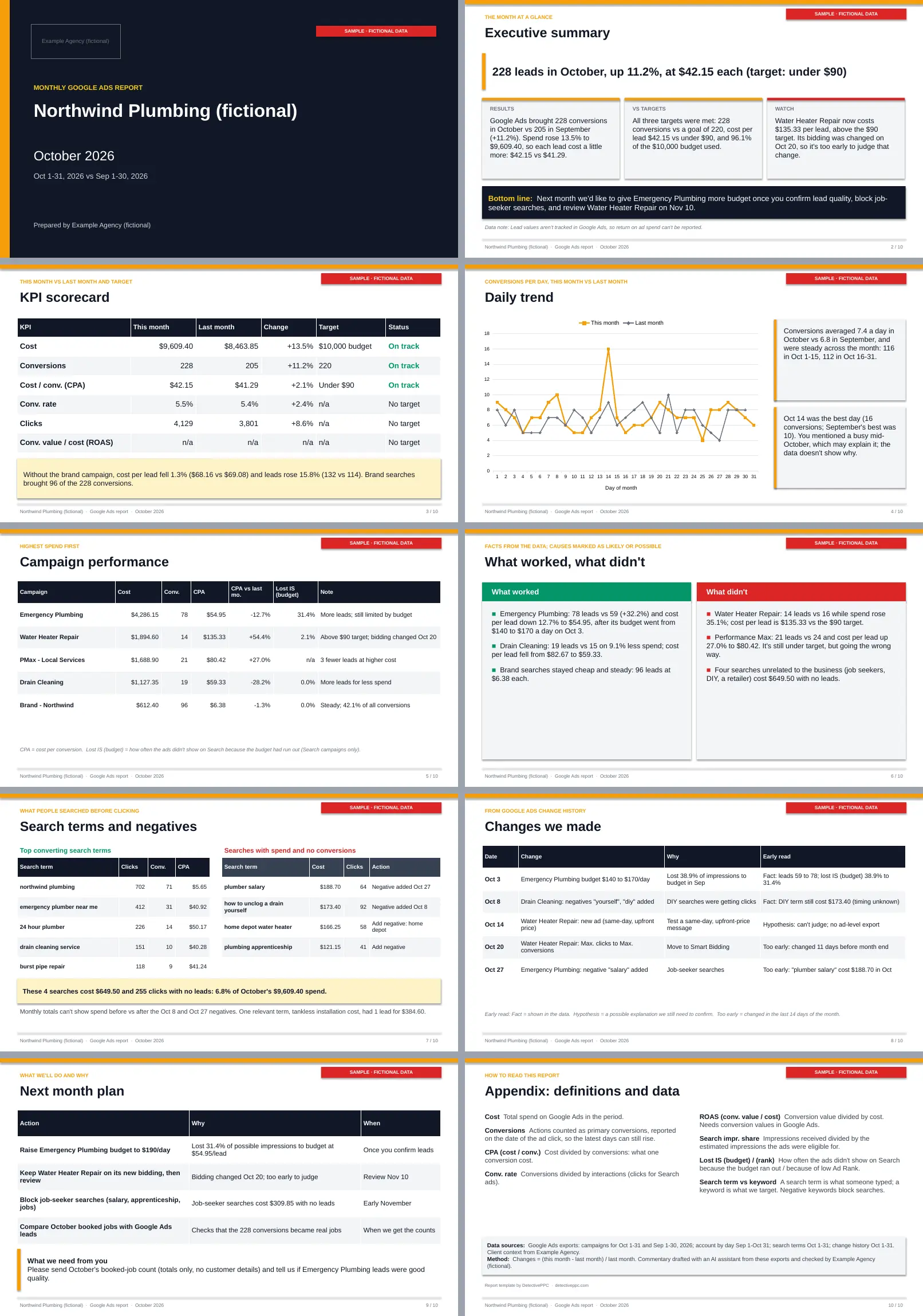
What the finished deck looks like
A full test run on a fictional plumber (Northwind Plumbing). Every number in the sample is invented. The emailed kit includes the exports, the AI output, and the finished slides.
The 5 exports you need
They take about 5 minutes once your column sets are saved. The data-prep guide in the kit has the Google Ads Help sources for each one.
- 01Campaigns, this monthCampaigns > Campaigns. Set the date range to the reporting month.Columns: Campaign, Campaign type, Cost, Impr., Clicks, Conversions, Cost / conv., Conv. rate, Conv. value, Search impr. share, Search lost IS (budget), Search lost IS (rank)
- 02Campaigns, last monthCampaigns > Campaigns. Repeat the same download for the previous month.Columns: The same columns as this month
- 03Daily trend (both months)Campaigns > Campaigns, date range covering both months, then the segment icon > Time > Day.Columns: Day, Cost, Clicks, Conversions
- 04Search terms, this monthCampaigns > Insights and reports > Search terms. Add the Keyword column if it is hidden.Columns: Search term, Match type, Campaign, Ad group, Keyword, Clicks, Impr., Cost, Conversions
- 05Change history, this monthCampaigns > Change history. Delete the User column (it can contain email addresses).Columns: Date & time, Campaign, Ad group, Changes
The prompt's rules
Quoted from the kit's commentary prompt. The emailed file has the full prompt, including the slide output fields.
- 1.Numbers come only from the attached data. Never estimate, round up, fill gaps or use industry benchmarks. If a number you need is missing, write "n/a" in the field and list it under MISSING DATA.
- 2.Compute every total, ratio and change yourself from the raw columns (Cost, Clicks, Impr., Conversions, Conv. value) and show the formula in CALCULATIONS. Formulas: CPA = Cost / Conversions. Conv. rate = Conversions / Clicks. Avg. CPC = Cost / Clicks. ROAS = Conv. value / Cost. % change = (this month - last month) / last month x 100. Recalculate account totals by summing campaign rows; don't average campaign ratios.
- 3.Ignore title rows above the header and any "Total" rows in the files. Read "--" as not available, not zero.
- 4.Rounding: money to 2 decimals with the currency symbol; % changes and rates to 1 decimal; conversions as they appear (they can be fractional). Show a + or - sign on every change.
- 5.If brand campaigns are named, also compute non-brand totals and say when brand changes the blended picture.
- 6.Facts vs hypotheses: a FACT is a number or event in the data (including a dated change in change history). A HYPOTHESIS is any reason why something happened. Write hypotheses with "may", "likely" or "possibly", never as certain, and never credit a change for a result unless the timing and the numbers both support it. Changes made in the last 14 days of the month are "too early to judge".
- 7.Small numbers: if a campaign or search term has fewer than 10 conversions in either month, say the change is not yet reliable instead of drawing a conclusion.
- 8.Search terms: a "waste" term has 0 conversions and is clearly unrelated to what the client sells (jobs, DIY, competitor retailers, wrong service). Don't call a relevant term waste just because it hasn't converted. The search terms report doesn't include every term, so its totals won't match campaign totals; don't treat the gap as an error. If a negative keyword was added mid-month, say the monthly data can't show how much spend came before vs after it.
- 9.Next month plan: use my planned next steps first. You may add at most one suggestion of your own, labeled "(suggested)".
- 10.Client language: no jargon in client fields. Write "cost per lead" or "cost per conversion" instead of CPA in sentences (the KPI table may keep "CPA"). Explain "lost impression share (budget)" as "times the ad could have shown but the daily budget had run out". No exclamation marks, no hype, no blame.
- 11.Stay inside every character limit (limits include spaces). If a field doesn't apply, write "n/a". Don't add fields.
- 12.Output only the sections below, in this order, with the KEY: value format exactly. Nothing before or after.
Frequently asked questions
Does it work in Google Slides?
Yes. Upload the .pptx to Google Drive and open it with Google Slides. The trend chart comes in as a picture there, so swap in your own chart with Insert > Chart > From Sheets (the speaker notes explain how).
Does it connect to my Google Ads account?
No. You download five standard exports and paste them into your AI tool. Nothing in your account changes.
Which AI tools does it work with?
ChatGPT, Claude and Gemini. The prompt is plain text, so most chat assistants that accept file uploads or pasted tables can run it.
How is this different from the AI Prompt Pack's monthly recap prompt?
That prompt (Prompt 23) writes a 300-word recap from one campaigns table. This kit is the whole report: five exports, a 10-slide template, output fields sized to the slides, a calculation log and a tested sample.
Is it safe to paste client data into AI?
Remove personal data first: customer names, emails, phone numbers, and the email addresses in change history's User column. Check your client agreement and your AI tool's data settings.
The prompt writes the report. The evidence still has to come from somewhere.
DetectivePPC connects to Google Ads with read-only access, runs an audit across 50+ dimensions in around 5 minutes, and gives you a health score, prioritized findings and a white-label PDF to share with a client. Scheduled audits and change detection show what changed between audits.
7-day trial · 1 free audit · Read-only access